● New · PRO and MAX plans

The TikTok LIVE overlay that makes your stream react to your audience

Gift alerts, like goal, ranking, on-screen chat, wheel, subathon timer and meme sounds your own chat triggers. All in one link, ready to paste into TikTok LIVE Studio or OBS.

🔗 One link🎥 LIVE Studio and OBS⚡ Updates in 2 s😂 23 ready-made sounds
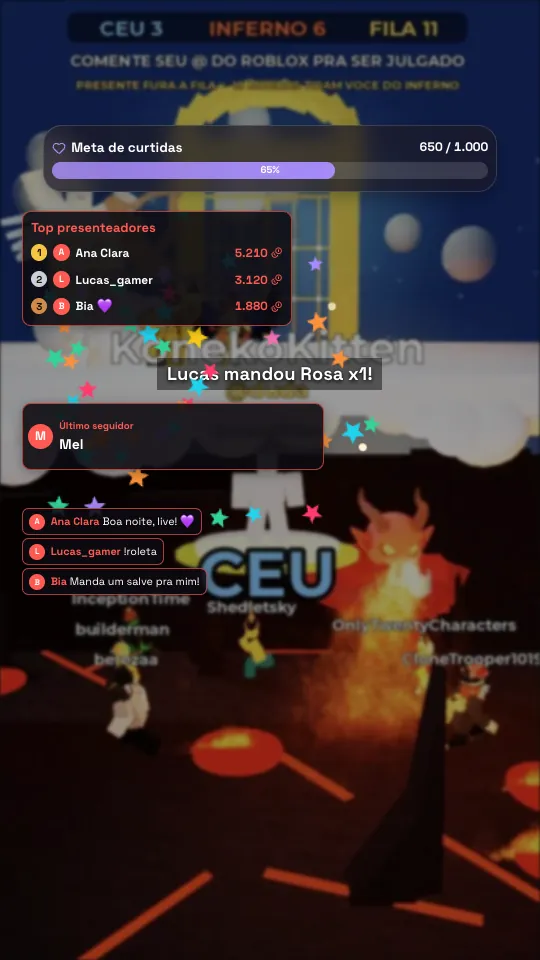
Overlay reacting to likes, gifts, followers and comments on a TikTok LIVE
Goal filling up, ranking, new follower, fireworks on a big gift and the chat's “ERROU” (wrong!)

Why use it

Streams that respond get more gifts

People who send a gift want to be seen. The overlay puts their name on screen, thanks them out loud, plays a sound and moves them up the ranking right away — and viewers notice that joining in makes something happen.

  • Automatic thank-yousThe sender's name shows up big, with animation, sound and voice, even when you're in the middle of a game.
  • Goals that pull viewers in“200 more likes to hit the goal” works. The bar fills up by itself and raises the target when it's hit.
  • Friendly competitionTop gifters, biggest gift of the stream, gift vs gift: viewers fight for the top spot.
  • Pranks the chat controlsThe chat types !errou, !boom or !grilos and the sound plays right away.
Overlay with a like goal, top gifters, latest follower, chat and a gift alert

What you can put on screen

19 ready-made widgets, your way

Pick one, drag it into place and adjust color, font, size and transparency. 35 ready-made styles, eight fonts and free positioning on a portrait (9:16) or landscape (16:9) screen.

🔔

Alerts area PRO

Where the images, videos, animations and text from your actions show up.

📊

Goal PRO

A bar for likes, followers, coins or one specific gift that raises its own target when it's hit.

🔢

Counter PRO

A live number: viewers, likes, coins, followers or shares.

🏆

Ranking PRO

Top gifters, who liked the most, who commented or shared the most.

⭐

Latest and biggest PRO

Latest follower, latest gift, biggest gift of the stream, latest subscription.

💬

Chat on screen PRO

Your stream's comments on the overlay, with profile photo and without the commands.

📜

Activity feed PRO

Gifts, followers, shares and subscriptions in a list.

💸

Live Pix alerts PRO

Live Pix payments, donations and memberships show up on the same overlay link.

📱

Social media PRO

Your Instagram, YouTube, Discord and other @ handles, rotating with an animation.

📝

Text and marquee PRO

A fixed or scrolling notice on screen, with live numbers inside the text.

🖼️

Image or video PRO

Logo, frame, banner or looping video on top of the stream.

🎁

Gift legend PRO

The “gift → what happens” table, so the chat knows what to send.

🎡

Wheel MAX

A wheel of fortune spun by a gift, a chat command or you.

⏱️

Timer and subathon MAX

Gifts, followers and likes add time. Also works as a countdown or stopwatch.

⚔️

Gift vs gift MAX

Two sides: each one scores with a gift or a word in the chat.

🗳️

Poll MAX

The chat votes by typing the option's number, and the bar shows the result live.

🎟️

Giveaway MAX

Whoever types the word is in; you draw the winner on the spot, followers only if you like.

🫙

Coin jar MAX

Gifts drop in and fill a glass jar on screen.

🎆

On-screen effects MAX

Like fountain, fireworks, gift rain and gift cannon, emoji rain.
Actions and events

When something happens, the overlay reacts

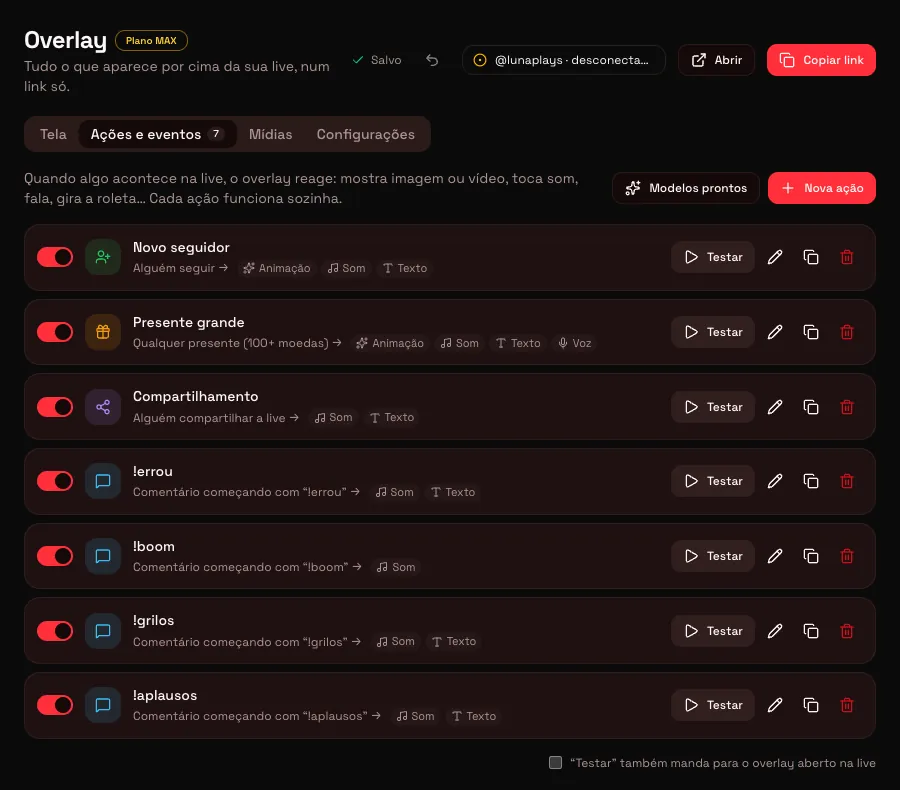
Each action is a simple rule: when X happens, the overlay does Y. Create as many as you want and test them with one click before going live.

  • WhenA gift (any gift, a specific one or worth X coins or more), a follow, every N likes, a comment or command, a share, someone joining the stream, a subscription.
  • Who canAnyone, followers only, moderators only, subscribers only or one specific @ only.
  • What happensImage, video, GIF or a ready-made animation (confetti, fireworks, hearts, stars, coin rain), sound, text with the person's name, a voice reading a line, spinning the wheel, adding time to the subathon.
  • No messAlert queue, cooldown per action and per person, grouped combos and “play right away” for quick sounds.
List of overlay actions and events with chat commands

Meme sounds for streams

The chat hits the button, the stream blows up

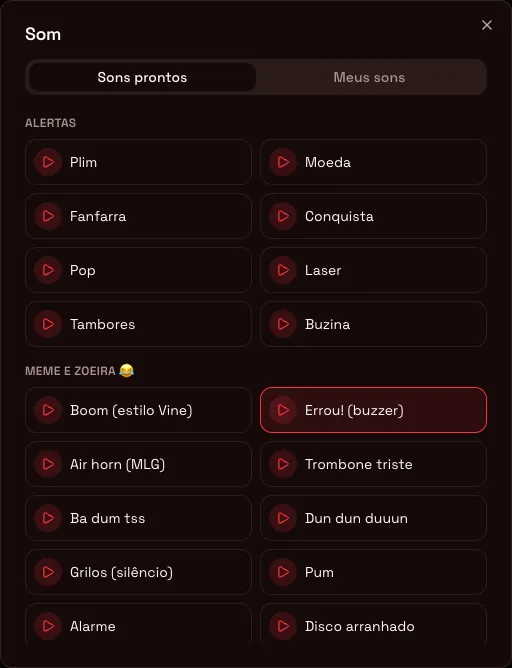
23 ready-made sounds that play instantly in OBS and LIVE Studio, nothing to download: 8 alert sounds and 15 meme sounds — boom, wrong buzzer, air horn, sad trombone, ba dum tss, dun dun duuun, crickets, fart, alarm, record scratch, boing, cartoon fall, explosion, game over and applause.

  • Ready-made commands!errou, !boom, !grilos, !aplausos and !f (sad trombone), each with a cooldown.
  • Gifts that troll“Fart on every Rose” and “air horn on 100+ coin gifts” come ready in the library.
  • Your own soundsUpload MP3, WAV or OGG in “My sounds” and use them in any action.
Overlay sound picker with the Alerts and Memes and fun sections

Editor

Build your screen by dragging

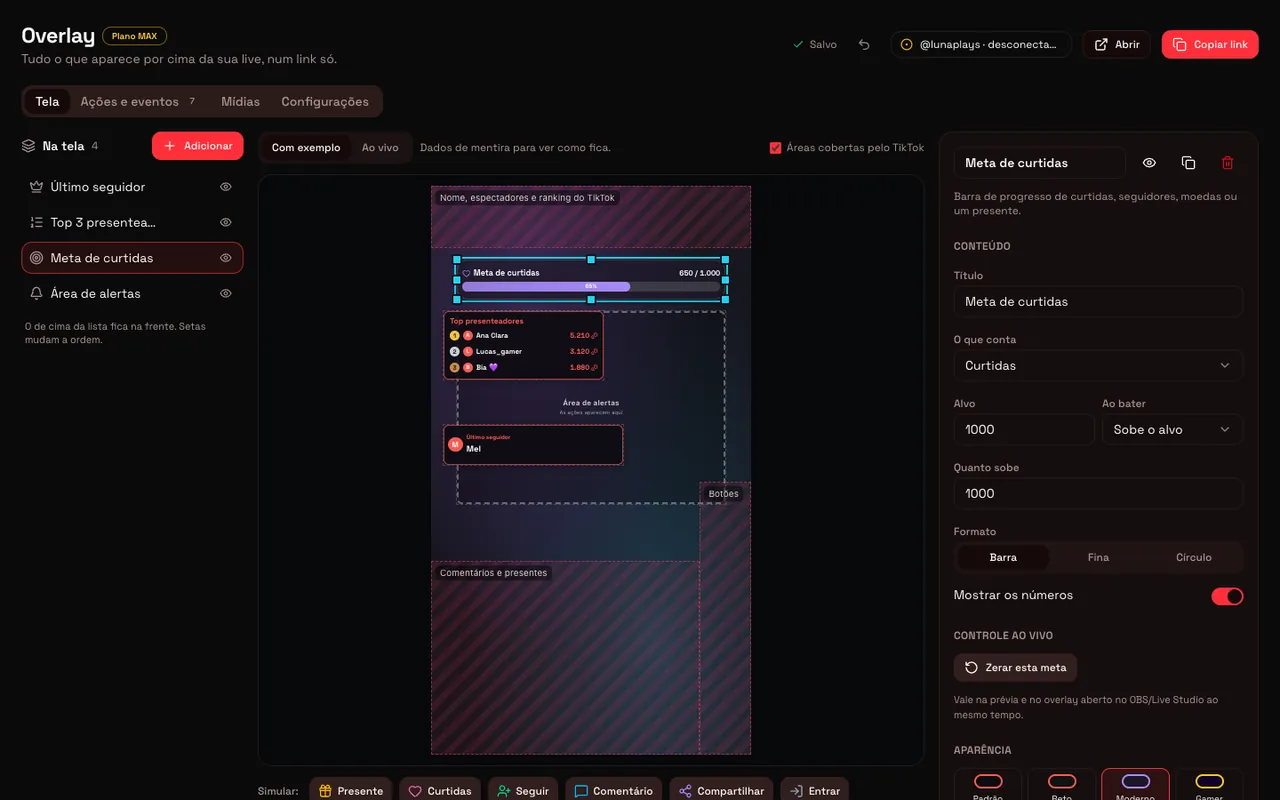
The preview matches the stream: it even shows the areas TikTok covers with your name, the comments and the buttons, so nothing important ends up hidden. Start from a ready-made screen — Essential, Subathon, Interactive or Minimalist — and adjust.

Overlay editor with the widget list, 9:16 preview and the goal editing panel
🧪

Simulate the stream

Gift, like, follower and comment buttons to see everything working before you go live.

💾

Saves on its own

Every change reaches the stream in about 2 seconds. Made a mistake? Ctrl+Z undoes it.

🎛️

Live control

Spin the wheel, pause the timer, reset the goal or skip an alert right from the panel, without touching OBS.

🗣️

Chat voice

Read comments out loud from everyone, only from people who sent a gift, or only with a command.

MAX plan

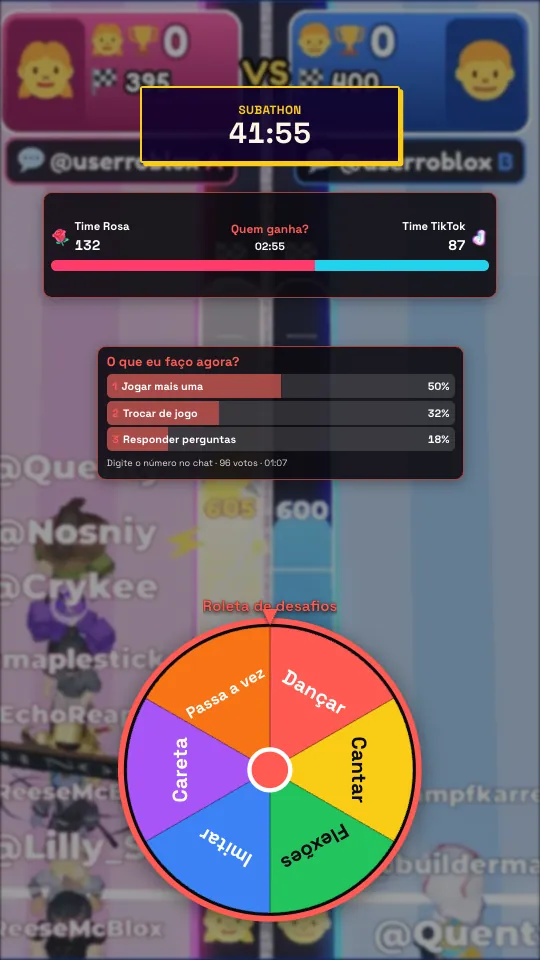
Real interaction: wheel, subathon and polls

The widgets that make your audience part of the show.

  • Challenge wheelDance, sing, pull a face, push-ups… spun by a gift, a command or you.
  • SubathonEvery coin, follower and like adds seconds to the clock. The stream lasts as long as the audience wants.
  • Poll and giveawayThe chat votes by typing the number; the giveaway picks from whoever typed the word.
  • Gift vs giftTeam Rose vs Team TikTok, with a bar and a timer.
MAX plan overlay with subathon, gift vs gift, poll and wheel

How to set up

Live in 3 steps

Nothing to install and no code to touch.

Build your screen

In the menu, go to Overlay, pick a ready-made screen or add widgets and actions. Use the simulate buttons to check everything.

Copy the link

Click Copy link at the top of the editor. It's an address just for you, and you can change it whenever you want.

Paste it into your streaming software

In TikTok LIVE Studio: Add Source → Link. In OBS: Source → Browser, 1080 × 1920. Done: the overlay connects to your stream on its own.

Tip: the full guide, with screenshots of each screen, is in our post how to set up an overlay on TikTok LIVE (in Portuguese).

Plans

The essentials in PRO, everything in MAX

Both plans also include the interactive games and the profile with Live Pix, donations and members.

FeaturePROMAX
Alerts, goals, counters, rankings, chat and feed✓✓
Socials, marquee, image/video, gift legend and Live Pix alerts✓✓
All 23 ready-made sounds, meme sounds included✓✓
Wheel, subathon, poll, giveaway and gift vs gift—✓
Coin jar and on-screen effects—✓
Actions active at the same time10100
Your own files (sounds, images, videos)20 · 50 MB200 · 300 MB
Read-aloud messages per day1001,000

PRO

$5.99/month

Essential overlay + the 20 native games.

  • Alerts, goals, rankings, chat and meme sounds
  • Up to 10 active actions
  • 20 native interactive games
  • Profile with Live Pix, donations and members
Get PRO

MAX

$9.99/month

Full access to the platform.

  • Full overlay: wheel, subathon, poll, giveaway and coin jar
  • Up to 100 actions and voice with no practical limit
  • Roblox games, Streamer vs Chat and Streamer vs Streamer
  • Everything in PRO
Get MAX

Frequently asked questions

Questions about the TikTok LIVE overlay

What is a stream overlay?

It's everything that shows on top of your stream's video: gift alerts, goals, rankings, chat, a timer. In TikTok LIVE Studio or OBS it goes in as a browser source, a link that shows all of this updated in real time.

Does the overlay work in TikTok LIVE Studio and OBS?

Yes. In LIVE Studio, add a Link source and paste the overlay address; in OBS, add a Browser source at 1080 × 1920 (portrait) or 1920 × 1080 (landscape). The background is transparent, so only the widgets show.

Do I need to install anything?

No. The overlay is a link. You build the screen on the site, copy the link and paste it into your streaming software. Changed something in the editor? Your stream picks up the new version in about 2 seconds, with nothing to reload.

What's the difference between PRO and MAX in the overlay?

PRO has the essentials: alerts, goals, rankings, chat and visuals, up to 10 active actions, 20 of your own files and 100 read-aloud messages a day. MAX opens up the interaction — wheel, subathon timer, poll, giveaway, gift vs gift, coin jar and effects — with up to 100 actions, 200 files and voice with no practical limit.

Are the meme sounds the original audio clips?

They're recreations made by the platform itself, in the style of the sounds that went viral (boom, wrong buzzer, air horn, sad trombone…). If you want a specific clip, you can upload your own file in “My sounds” and use it in any action.

Can the chat trigger sounds and effects?

Yes. Create an action with the Comment trigger and a command, like !errou or !boom. Each action has a cooldown so nobody turns your stream into a siren, and you can limit it to followers, moderators, subscribers or one specific @.

Can I use the overlay together with the interactive games?

Yes. The overlay is a layer on top of anything: a native game, a Roblox map, Streamer vs Chat or your camera.

Your stream deserves to react to your audience

Build your overlay in minutes and paste the link into TikTok LIVE Studio or OBS.

Get started