Bikini Bottom
SpongeBob
Bob's voice. The gift falls from the sky and Mr. Krabs tries to grab it.
An AI VTuber that talks to chat: a 3D character that reads your TikTok LIVE comments and answers out loud on its own, calling each person by name. Gifts turn into dances, push-ups and celebrations. Works in TikTok LIVE Studio, OBS and on your phone.
Already subscribed? Open the AI Avatar
How it works
You go live, connect your @ and the character handles the conversation. No need to talk, show your face or have a webcam.
The avatar listens to your stream's chat through your TikTok @, in real time.
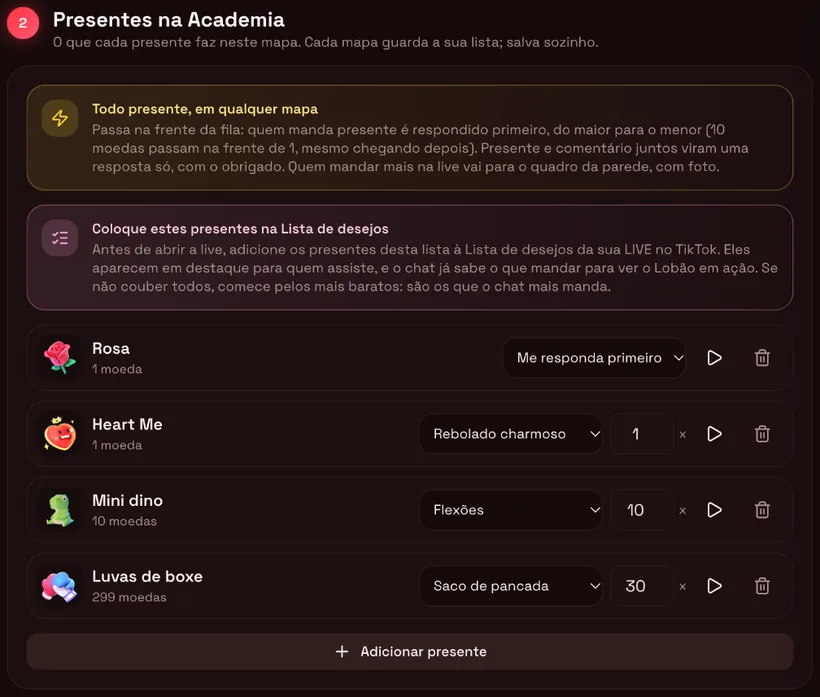
Whoever sends a gift gets answered first, in order of value. The Rose comes set to Reply to me first.
With the commenter's photo, name and message, so everyone can see who asked.
Facing the camera, with the character's voice and personality. When the chat goes quiet, it starts a conversation on its own.
The maps
One click and the map comes with the character, the voice, the way of talking and the gifts already set up.
SpongeBob
Bob's voice. The gift falls from the sky and Mr. Krabs tries to grab it.
Pickle Rick or Rick
Rick's voice. Every gift opens a green portal.
Santa Claus
Every wish becomes a kid on his lap; he reads the letter. 10 coins: a sleigh ride.
Lobão
A deep-voiced gym rat. Gifts turn into push-ups, jumping jacks and dancing.
Amy, alien guide
Whoever sends a gift gets abducted by the spaceship; the top gifter wins the throne.
Patrício, lucky leprechaun
Gifts become coins in the fountain and he reads the sender's wish.
Your own 3D avatar
Upload the character (.vrm, .glb or .fbx) and your background image.
Bikini Bottom
Bob stands on his street at the bottom of the sea, with the neighbors' houses behind him, and answers every comment his way: excited, optimistic, laughing at everything.
SpongeBob is a trademark of Nickelodeon (Paramount) and Rick and Morty is a trademark of Adult Swim (Warner Bros. Discovery). Interactive Live has no connection with these studios and the characters on the platform are not official: the 3D models come from community artists, with credit, and the voices from the Fish Audio library. Before unlocking the link for these maps, the streamer checks a box stating they take on the copyright and voice-rights risks, including reports and removal by TikTok. Full guide: AI SpongeBob avatar for TikTok LIVE (in Portuguese).
Rick's Garage
TV's most sarcastic scientist talks with your chat in his garage lab, in Rick's voice.
Guide: Rick and Morty with AI on TikTok LIVE (in Portuguese).
Santa's Christmas
Everyone who comments becomes a 3D kid in line. On their turn, they climb onto his lap, hand over their letter and Santa reads the wish out loud.
Guide: AI Santa Claus for a Christmas TikTok LIVE (in Portuguese). 3D models of Santa, the elf and the sleigh by Sketchfab artists, with credit (CC BY 4.0).
Voices
The voice comes with the map and moves the character's mouth along with the speech. The free voice runs on the device you stream from; character voices are generated on the server.
| Map | Voice | Credits per answer |
|---|---|---|
| Bikini BottomSpongeBob | Bob's voice (Fish Audio) | ~2 |
| Rick's GaragePickle Rick or Rick | Rick's voice (Fish Audio) | ~2 |
| Wishing FountainPatrício | Old Man voice, calm, storyteller-style (Fish Audio) | ~2 |
| Santa's ChristmasSanta Claus | Free Santa voice, deep and slow | ~1 |
| GymLobão | Free Deep voice, at the lowest pitch | ~1 |
| Planet BlipAmy | Free female alien voice, with the Blips' chorus | ~1 |
| Create your ownYour avatar | Free voice | ~1 |
Three voices per language (Deep, Medium and Young), generated on the PC or phone you stream from. It downloads once; on a phone, do it on Wi-Fi.
Bob's, Rick's and Patrício's voices come from Fish Audio. The OpenAI voice is the backup.
English, Spanish or Portuguese, with the ready-made lines translated and dedicated voices for each language.
PC and phone
The avatar is a link. On PC it goes in as a source in LIVE Studio or OBS; on a phone, it opens full screen and you stream your screen.
Step by step: going live from your phone with an AI avatar (in Portuguese).
How to add it to your stream
The first time takes about 5 minutes. After that the link never changes, even when you switch maps.
Under AI Avatar, click the scene. Test the voice and the gifts in the preview, at no cost.
On the link card, tick the terms box. Maps with cartoon characters also show the rights box.
LIVE Studio: + Add Source → Link, 1080 × 1920. OBS: Sources → + → Browser.
Once you're live, go to Live on TikTok, enter your @, click Connect and reload the source.
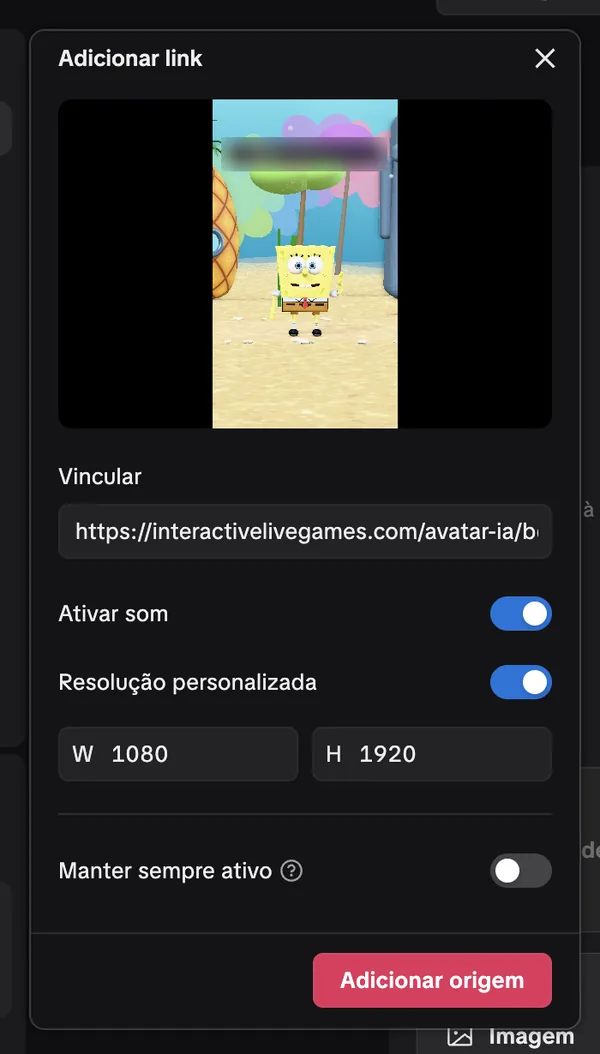
With screenshots of every screen: how to add the AI avatar to TikTok LIVE Studio and OBS (in Portuguese).
Gifts
Every map comes with a ready-made list. Change the action, adjust the amount and test it in the preview; everything saves automatically.
Plans and credits
Each answer uses credits, because the AI really writes and speaks. The plans come with credits every month; actions, dances and ready-made lines are free.
AI Avatar + games + overlay.
Everything on the platform unlocked.
| Extra credits | Price |
|---|---|
| 1,000 credits | $3 |
| 2,000 credits | $6 |
| 5,000 credits | $15 |
| 10,000 credits | $30 |
| Outside BrazilEnglish or Spanish site, paid by card | $3 per 1,000 |
How far it goes: 1 credit is about 1 answer with the free voice, or half an answer with a character voice. Plan credits renew on your payment day and are used before purchased ones. Payment is in US dollars, by card, and the credits arrive automatically.
Safety on stream
On by default in the corner of the screen, so viewers know an AI is answering.
List words it should ignore. The platform's filter even catches words spelled with swapped letters.
Stream over or disconnected: it goes quiet, clears the queue and stops using credits.
Use and privacy are covered in the AI Avatar Terms, accepted once before unlocking the link.
SpongeBob is a trademark of Nickelodeon (Paramount) and Rick and Morty is a trademark of Adult Swim (Warner Bros. Discovery). Interactive Live has no connection with these studios and the characters on the platform are not official: the 3D models come from community artists, with credit, and the voices from the Fish Audio library. Before unlocking the link for these maps, the streamer checks a box stating they take on the copyright and voice-rights risks, including reports and removal by TikTok.
Frequently asked questions
A 3D AI character that stays on your TikTok LIVE, reading the comments and answering on its own, out loud, with the viewer's photo, name and message on screen. Gifts turn into actions, like dancing, push-ups and celebrating.
Yes: on the map Bikini Bottom, a 3D Bob answers the chat in Bob's voice and Mr. Krabs tries to grab the gifts that fall from the sky. It's a fan-made, unofficial character; the streamer accepts the rights risks before using it.
Yes: on the map Santa's Christmas, each person in the chat becomes a kid in line to sit on Santa's lap; he reads the wish out loud and hands over a present. Gifts jump the queue, and 10 coins or more turn into a sleigh ride.
No. It reads the chat and answers on its own. You don't need a webcam or a microphone.
It works in both. The avatar is a link: in LIVE Studio, add a Link source at 1080 × 1920; in OBS, a Browser source with the same link.
Yes. With your stream connected, tap Open the character screen: it fills your phone screen and you go live on TikTok sharing your screen. It also works in the Interactive Live app.
English, Spanish or Portuguese, chosen in the live settings. The ready-made lines and the free voice come in all three languages.
It's included in the PRO ($5.99/month, with 333 free credits a month) and MAX ($9.99/month, with 666) plans. Extra credits cost $3 per 1,000. Each answer uses about 1 credit with the free voice and about 2 with a character voice, like Bob's.
No. When the stream ends or you click Disconnect, it stops, clears the queue and doesn't use any more credits.
The 3D Avatar copies you through your webcam: you talk and it moves with you. The AI Avatar talks on its own: it reads the chat and answers in the character's voice.
More guides: AI avatar for TikTok LIVE (in Portuguese), AI that answers the live chat (in Portuguese) and streaming without showing your face, with an AI avatar (in Portuguese).
Pick the map, paste the link and connect your stream.
Start nowAlready have an account? Open the AI Avatar